The Onboarding Audit System (Not Just a Prompt)
You've probably seen the viral ChatGPT prompt. The one where you paste your company docs and ask AI to “pretend you're a new hire—what questions would you have?” It gets thousands of shares every time someone rediscovers it. And here's the thing—it actually works. But it's incomplete.
The Prompt Works. The Problem is What Happens Next.
I work with founders and operations leads who run this prompt once. They get a list of 15-20 gaps in their documentation. They feel productive. Then the list sits in a Notion page for six months.
Let me give you an example. Bob runs a 12-person marketing agency. He ran the viral prompt in January. Got a solid list of questions—things like “What's the escalation process when a client misses a deadline?” and “Who approves final deliverables?”
Good questions. Real gaps. Bob even fixed a few of them.
By March, Bob had hired two new account managers. They had the same questions. The prompt didn't remember what Bob had already fixed. It didn't know his team had changed. It just spit out another list—70% overlap with the January output.
I think the real issue lies in the fact that a prompt gives you a snapshot. A snapshot of gaps at a single point in time. Business doesn't work in snapshots. It works in systems.
Snapshots vs. Systems
Here's the difference.
A snapshot tells you what's wrong right now. Useful. But static. The moment your processes change, your team changes, or your tools change—the snapshot is stale.
A system tracks what's wrong, what you've fixed, and what's emerged since. It compounds. Every time you run it, it gets smarter because it remembers the last run.
I think the real issue lies in the fact that most people treat AI like a vending machine. Insert prompt. Receive output. Walk away.
But AI can be infrastructure. Something that learns, adapts, and improves alongside your business—if you build it that way.
The Onboarding Audit System: 3 Components
I've been building onboarding audit systems for clients since early 2024. After testing across 30+ companies, I've landed on three components that make the difference between a one-time prompt and a compounding system.
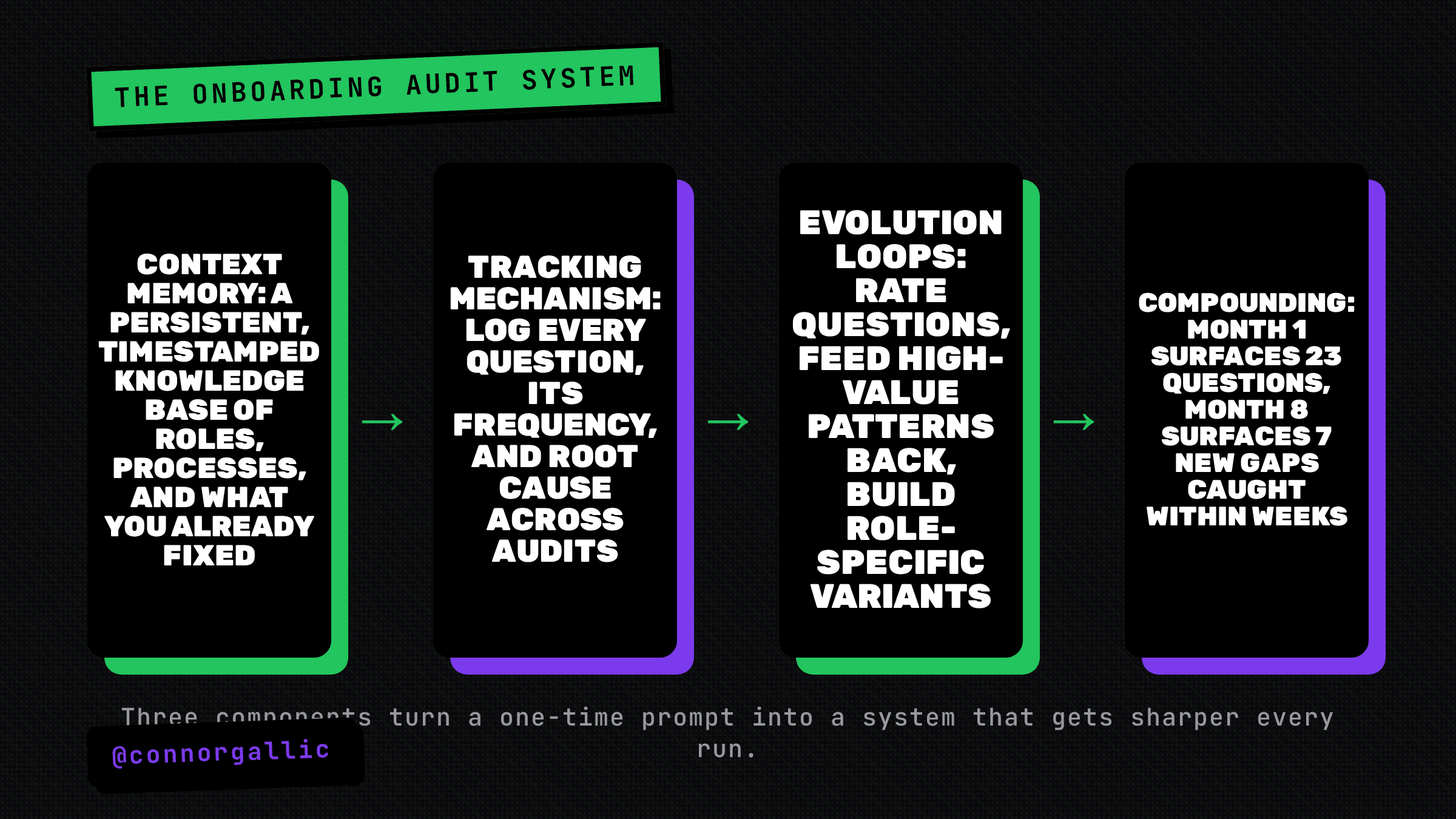
Component 1: Context Memory
The viral prompt fails because ChatGPT doesn't remember your last conversation. Every time you run it, you're starting from zero.
Context memory fixes this. Here's how it works:
- Create a persistent knowledge base. This isn't your company wiki. It's a structured document that tracks what the AI knows about your organization—roles, processes, tools, recent changes.
- Update it after every audit. When you run the audit and fix gaps, log what you fixed. The next audit references this log.
- Include timestamps. A process documented in January might be outdated by July. Timestamps let the system flag stale information.
I use a simple structure: Entity (what), Status (current/outdated/new), Last Updated, Notes. Four columns. Takes 10 minutes to maintain after each audit.
Component 2: The Tracking Mechanism
Running the prompt isn't enough. You need to track what questions keep appearing across audits.
Let me give you an example. One client ran their audit monthly for six months. The question “How do we handle refunds?” appeared in five of those six audits. Not because they hadn't documented the refund process—they had. The documentation just wasn't where new hires looked for it.
The tracking mechanism revealed the pattern. The fix wasn't better documentation. It was better navigation.
I think the real issue lies in the fact that recurring questions aren't documentation failures. They're system design failures. Tracking exposes the difference.
Here's what to track:
- Question text (exactly as the AI phrased it)
- Date first appeared
- Frequency (how many audits it's appeared in)
- Resolution status (open/fixed/recurring)
- Root cause (documentation gap vs. navigation issue vs. process unclear)
Component 3: Evolution Loops
This is where it gets interesting.
An evolution loop is a feedback cycle that makes the system smarter over time. You're not just running audits—you're training the audit to ask better questions.
Here's how I build evolution loops:
- Run the standard audit. Same prompt, same process.
- Rate the questions. After each audit, rate each question: High value (this exposed a real gap), Medium value (useful but not critical), Low value (already addressed or irrelevant).
- Feed ratings back into the prompt. “In previous audits, these types of questions were rated high value: [examples]. Focus on similar blind spots.”
- Adjust for role and tenure. A Day 1 new hire has different questions than a Day 30 new hire. Build role-specific audit variants.
After 4-5 cycles, the audit stops asking generic questions. It starts asking questions specific to your actual gaps—the ones your team keeps missing.
Implementation: How to Build This
I'll be honest—you can build this in a weekend if you're comfortable with AI tools. Here's the practical walkthrough.
Step 1: Set Up Your Knowledge Base (30 minutes)
Create a document with four sections:
- Company Context: What you do, who you serve, how you're structured
- Process Inventory: List of all documented processes with their locations
- Recent Changes: Anything that's changed in the last 90 days
- Known Gaps: Questions that have appeared in previous audits (start empty)
Step 2: Build the Audit Prompt (15 minutes)
Start with the viral prompt, then add context memory:
“You are a new employee at [Company]. You have access to the following documentation: [paste docs]. You also have access to this context file showing what the company has already identified and fixed: [paste knowledge base].
Based on the documentation AND the context of what's already been addressed, what questions would you have on Day 1? Day 7? Day 30? Focus on gaps that haven't been previously identified.”
Step 3: Create the Tracking Sheet (10 minutes)
Simple spreadsheet. Five columns: Question, Date First Seen, Appearances, Status, Root Cause. Update after every audit.
Step 4: Run Your First Audit (20 minutes)
Run the prompt. Export the questions. Add them to your tracking sheet. Identify 3-5 to fix immediately.
Step 5: Build the Evolution Loop (ongoing)
After each audit, rate the questions. Feed high-value patterns back into the next audit's prompt. Watch the quality improve.
What Happens When You Compound
I ran this system with a 45-person SaaS company for 8 months. Here's what happened:
- Month 1: Audit generated 23 questions. 18 were genuinely useful.
- Month 3: Audit generated 19 questions. 15 were useful, 4 were recurring issues they thought they'd fixed.
- Month 6: Audit generated 11 questions. All 11 were new gaps caused by recent process changes.
- Month 8: Audit generated 7 questions. The system was now catching gaps within weeks of them appearing instead of months.
The one-time prompt would have generated the same 23 questions in Month 8 as Month 1. The system evolved. It got sharper. It started predicting gaps before new hires stumbled into them.
The Part Nobody Talks About
Look, I'm not going to pretend this is magic. The system works because someone maintains it. That means updating the knowledge base. That means running the audit monthly. That means actually fixing the gaps you find.
I think the real issue lies in the fact that most “AI hacks” assume zero ongoing effort. This one assumes 2-3 hours per month. If you won't commit to that, stick with the viral prompt. Run it once a quarter. Accept diminishing returns.
But if you want a system that compounds—one where your onboarding gets measurably better every month—this is how you build it.
The prompt is the starting point. The system is the destination.